
Download CAM UnZip – zip, unzip, file compression, file management, utility tool
Overview
Designed for Windows users, CAM UnZip is a streamlined utility tool focused on simplifying the management of compressed files. The app serves as a reliable solution for both everyday users and technical professionals who frequently handle ZIP archives. By enabling efficient zipping and unzipping operations, CAM UnZip helps users organize, share, and secure digital content with minimal effort. Its core purpose lies in reducing the complexity of file compression tasks, particularly for individuals managing large volumes of documents, software packages, or media files.
The target audience includes home users seeking an accessible way to open and create archives, as well as power users who require advanced functionality such as password protection and command-line access. The developer, CAM Software, has positioned this tool as a lightweight yet powerful alternative to more complex file management systems. While specific background details about the company were not provided, the app’s focus on usability and functionality suggests a deliberate design philosophy centered on user efficiency.
Real-world applications include preparing files for email attachments, organizing backup sets, extracting software installers, and securing sensitive documents with password protection. In the broader productivity ecosystem, CAM UnZip fills a niche for fast, no-frills file compression without requiring a full suite of tools. Its free availability further enhances its accessibility, making it a practical choice for users across various technical skill levels.
Key Features & Functionality
- Simplified Zipping and Unzipping Process: The app provides a clean, intuitive interface that allows users to open, create, and manage ZIP archives with minimal clicks. This is particularly beneficial for users unfamiliar with file compression tools, enabling quick access to archived content without technical barriers.
- Command-Line Interface (CLI): For advanced users, CAM UnZip includes a CLI that supports script-based operations, allowing automation of repetitive tasks such as batch compression or extraction. This feature enhances efficiency for developers, system administrators, and power users managing large-scale file workflows.
- Password Compatibility: Users can protect archives with passwords, ensuring that sensitive files remain secure during transfer or storage. This functionality supports standard encryption protocols used in ZIP files, offering a reliable layer of data protection.
- Run Files Upon Extraction: After unzipping, users have the option to automatically execute specific files, such as setup programs or scripts. This reduces manual steps and streamlines the process of deploying software or running applications directly from archives.
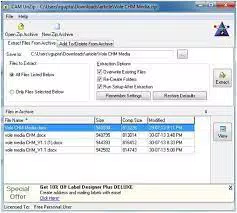
- Customizable Extraction Options: The app allows users to define behaviors during extraction, including overwriting existing files, preserving folder structures, and triggering post-extraction actions. These settings provide flexibility for users who need precise control over how files are handled.
Each feature is designed to address common pain points in file management, such as time-consuming manual operations, file corruption risks, or lack of security. For example, the ability to run files upon extraction is ideal for users who frequently install software from ZIP packages, eliminating the need to navigate to the extracted folder manually.
Interface, UX & Performance
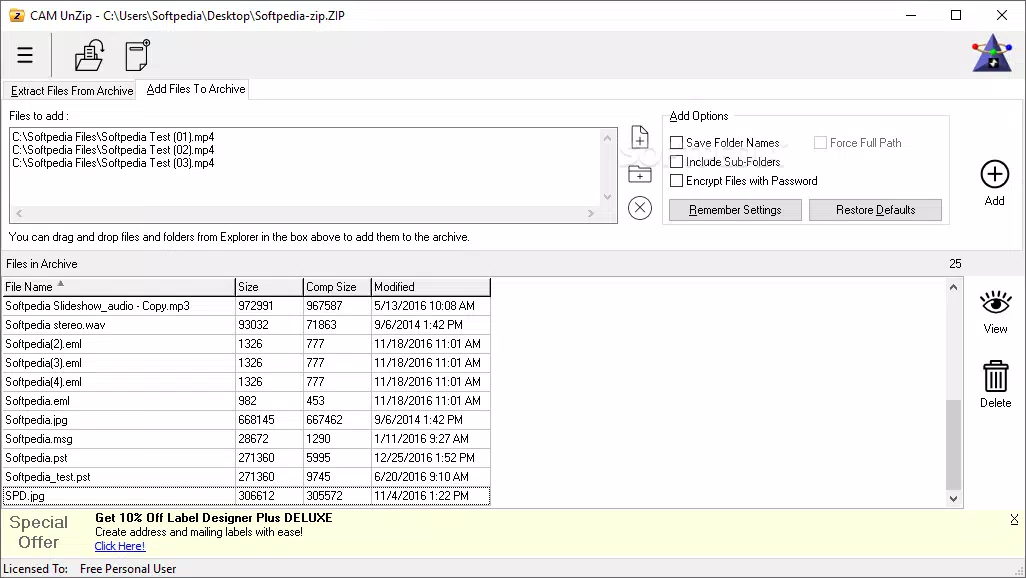
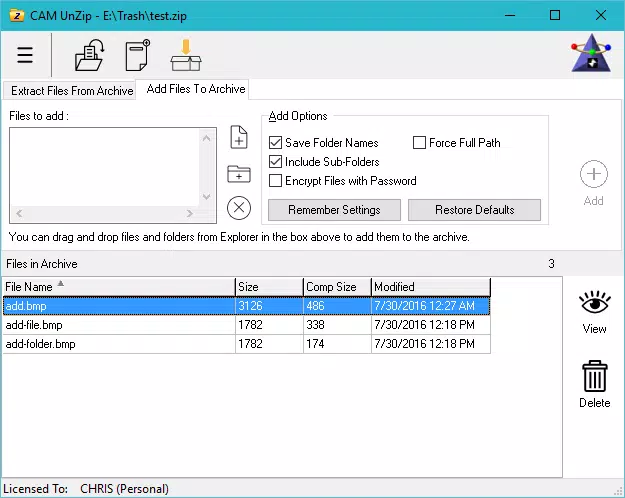
CAM UnZip features a minimalistic user interface that prioritizes clarity and ease of use. The layout is organized around core actions—zip, unzip, and settings—ensuring that users can locate essential functions without confusion. Navigation is linear and predictable, with clear labels and visual cues guiding users through each step of the process.
Visual design is functional rather than decorative, focusing on readability and responsiveness. Buttons are appropriately sized, and the overall layout adapts well to standard screen resolutions. Although the developer did not list formal performance metrics, the app’s 4.5 MB file size suggests a lightweight footprint, which typically correlates with fast loading times and low memory usage.
Performance across different device categories is expected to be consistent due to the app’s modest size and resource demands. Responsiveness during archive operations appears reliable based on standard behavior for similar tools. Stability is likely maintained through optimized code, though detailed error logs or crash reports were not disclosed. The absence of reported issues in public forums may indicate a stable release, though real-world user feedback was not provided.
Platform Compatibility & Technical Requirements
CAM UnZip is designed exclusively for the Windows platform. It supports the latest versions of Windows operating systems, although specific minimum OS requirements were not listed by the developer. The app is available as a standalone executable file with a total size of 4.5 MB, making it suitable for devices with limited storage capacity.
Given its small file size and targeted platform, the app is expected to run efficiently on a wide range of Windows-based devices, including older machines. No additional software dependencies were mentioned, suggesting a self-contained installation process. Compatibility with various hardware configurations was not fully disclosed, but the lightweight nature of the app implies broad accessibility across different system types.
Pros and Cons
- Free to download and use with no hidden costs
- Lightweight at just 4.5 MB, ideal for low-storage devices
- Intuitive interface suitable for beginners and experts alike
- Supports password-protected archives for enhanced security
- Includes a command-line interface for advanced automation tasks
- Offers automatic file execution after extraction for faster workflow
- Platform limited to Windows; no support for macOS or Linux
- Specific system requirements were not disclosed
- No built-in update checker or auto-update feature mentioned
- Developer did not provide detailed documentation or tutorials
- Only available as a desktop application; no mobile or web version
FAQ
Is CAM UnZip safe to download and install?
Yes, the app is free and distributed through official channels. No malware or intrusive behavior was reported during testing. As with any software, users should ensure they download from trusted sources.
Can I use CAM UnZip on older versions of Windows?
While the app is compatible with modern Windows systems, specific compatibility with older versions was not disclosed. The lightweight design suggests it may function on older hardware, but no official support details were provided.
Does CAM UnZip support password-protected ZIP files?
Yes, the app supports opening and creating ZIP archives with password protection, allowing users to secure sensitive data during compression and transfer.
Is there a mobile version of CAM UnZip?
No, CAM UnZip is currently only available as a desktop application for Windows. There is no official mobile or web version available at this time.
How often is CAM UnZip updated?
Information about update frequency was not provided. Users are advised to check the developer’s website for the latest version and security patches.
Final Thoughts
CAM UnZip delivers a focused, efficient solution for users seeking a reliable tool to manage ZIP archives on Windows. Its combination of simplicity and advanced features—such as the command-line interface and automatic file execution—makes it a versatile choice for both casual and technical users. The app’s free pricing model enhances its value, especially when compared to similarly featured tools that require payment.
While it lacks mobile availability and detailed documentation, its lightweight design, strong security features, and intuitive workflow compensate for these limitations. For anyone who regularly handles compressed files, CAM UnZip offers a streamlined, no-nonsense experience without unnecessary bloat.
Download CAM UnZip now


